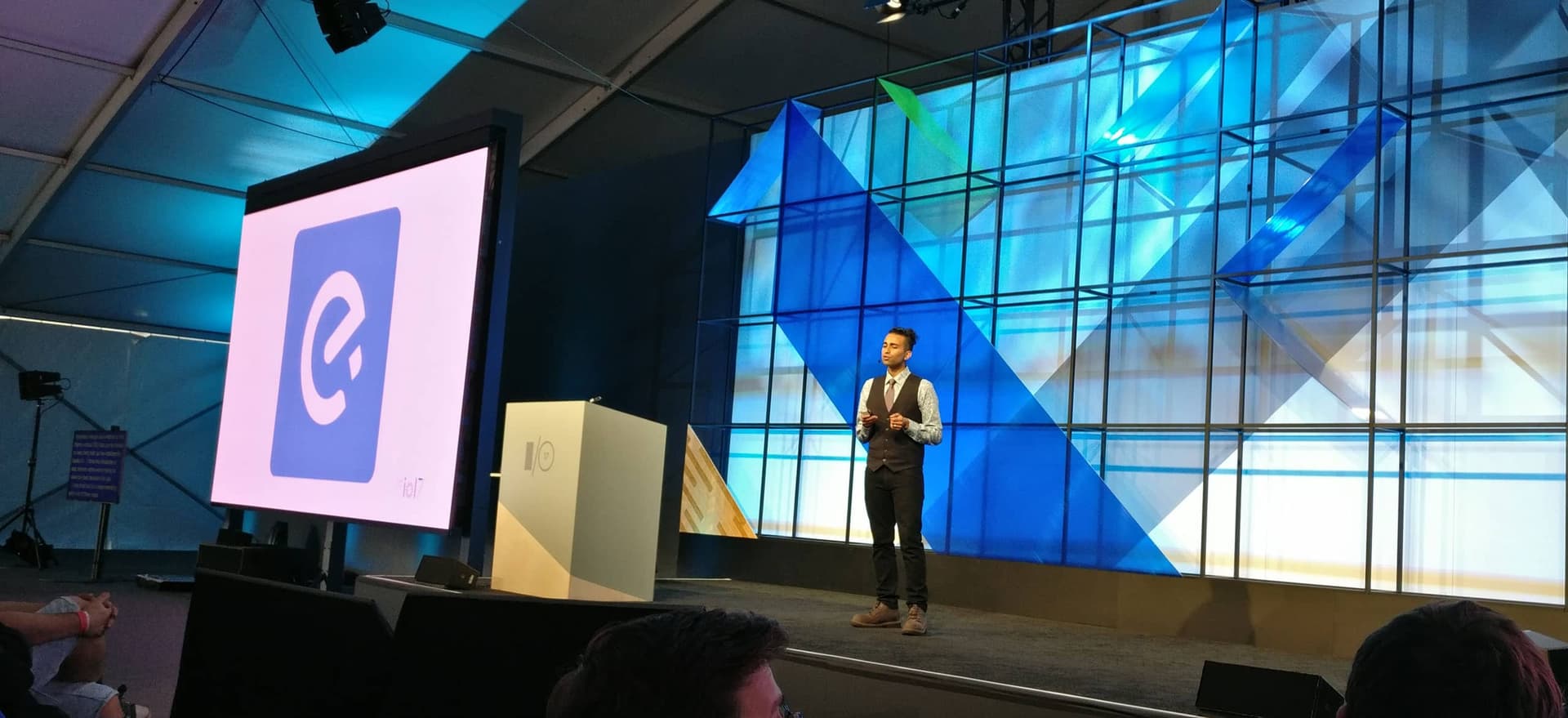
Since the very first experiments that @Vue.js tweeted, we at Ele.me (the biggest food ordering and delivery company in China) have been working on upgrading our mobile website to a Progressive Web App. We’re proud to ship the world’s first PWA exclusively for the Chinese market, but even prouder to collaborate with Google, UC and Tencent to push the boundary of web experience and browser support in China.
Multi-page, Vue, PWA?
There is a prevailing opinion that only structuring a web app as a Single Page App can we build PWAs that deliver app-like user experience. Popular reference examples such as Twitter Lite, Flipkart Lite, Housing Go and Polymer Shop are all using the SPA model.
However at Ele.me, we’ve come to appreciate many advantages of a Multi-Page App model, and decided to refactor the mobile site from an Angular 1 SPA to a Multi-page app more than a year ago. The most important advantage we see is the isolation and decoupling between pages, which allows us to build different parts of the mobile site as “micro-services”. These services can then be independently iterated, embedded into 3rd-party apps, and even maintained by different teams.
Meanwhile, we still leverage Vue.js to boost our productivity. You may have heard of Vue as a rival of React or Angular, but Vue's lightweight nature and performance also make it a perfect replacement for the traditional "jQuery/Zepto + template engine" stack when engineering a Multi-page app. We built every component as Single File Components so they can be easily shareable between pages. The declarativeness plus reactivity Vue offers help us manage both code and data flow. Oh, did I mention that Vue is progressive? So things like Vuex or Vue-Router can be incrementally adopted if our site's complexity scales up, like...migrating to SPA again? (Who knows...)
In 2017, PWA seems to be all the rage, so we embarked on exploring how far our Vue-based Multi-page PWAs can actually go.
Implementing "PRPL" with MPA
I love PRPL pattern because it gives you a high-level abstraction of how to structure and design your own PWA systems. Since we were not rebuilding everything from scratch, we decided to take implementing PRPL as our migration goal:
1. PUSH critical resources for initial URL route.
The key to pushing/preloading is to prioritize resources hidden in a deep dependency graph and make the browser's network stack busy ASAP. Let's say you have a SPA with code splitting by route, you can push/preload chunks for the current route before the "entry chunks" (e.g. webpack manifest, router) finish downloading and evaluating. So when the actual fetches happen, they might already be in caches.
Routes in MPAs naturally fetch code for that route only, and tend to have a flattening dependency graph. Most scripts depended on by Ele.me are just <script> elements, so they can be found and fetched by the good old browser preloader in the early parsing phase without explicit <link rel="preload">.
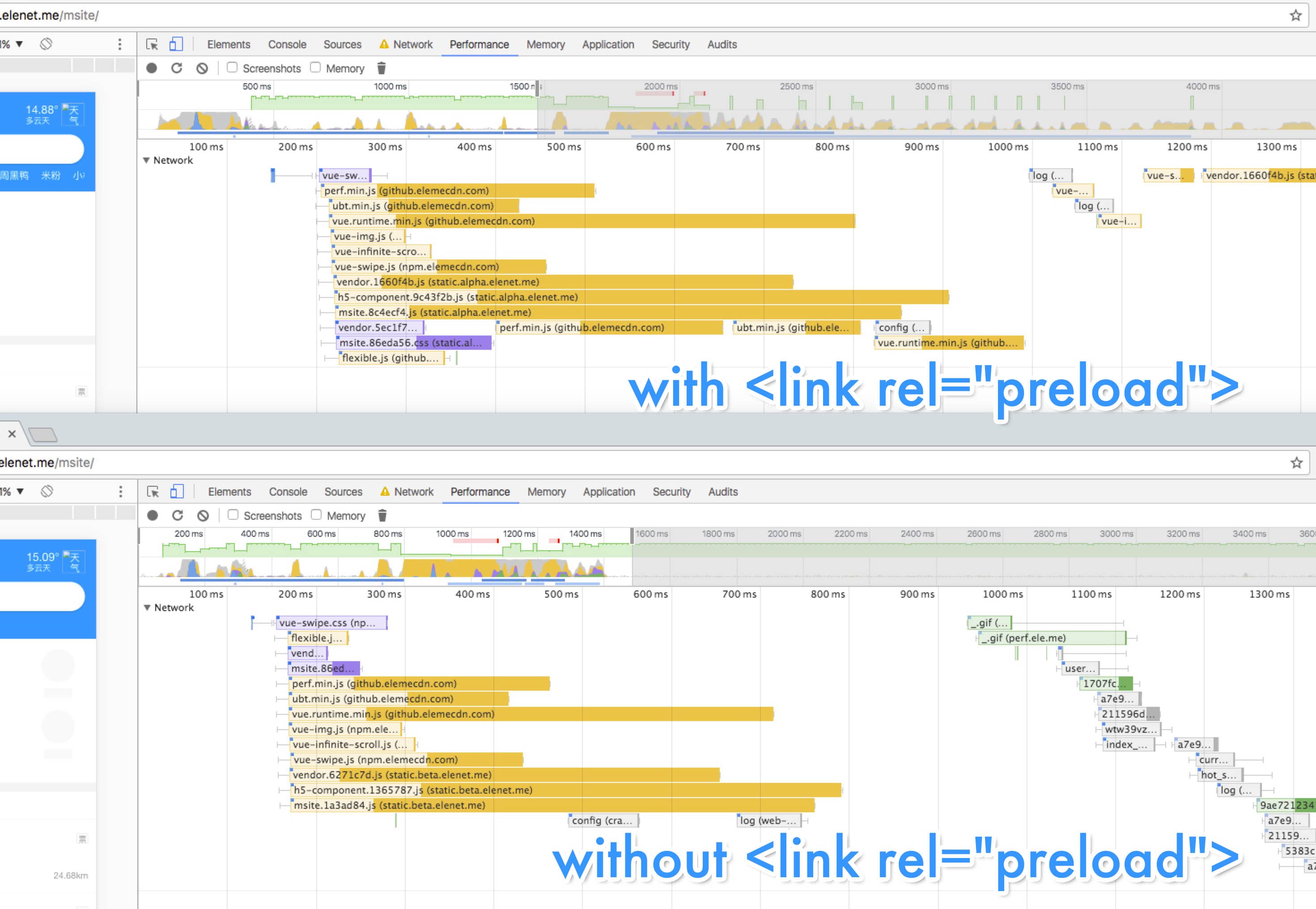
To take advantage of HTTP/2 Multiplexing, we currently serve all critical resources under a single domain (no more domain sharding), and we are also experimenting on Server Push.
2. RENDER initial route & get it interactive ASAP
This one is essentially free (ridiculously obvious) in MPA since there's only one route at one time.
A straightforward rendering is critical for metrics such as First-Meaningful-Paint and Time-To-Interactive. MPAs gain it for free due to the simplicity of traditional HTML navigation they used.
3. PRE-CACHE remaining routes using Service Worker
This's the part Service Worker come to join the show. Service Worker is known as a client-side proxy enabling developers to intercept requests and serve responses from cache, but it can also perform proactive fetches to prefetch and then precache future resources.
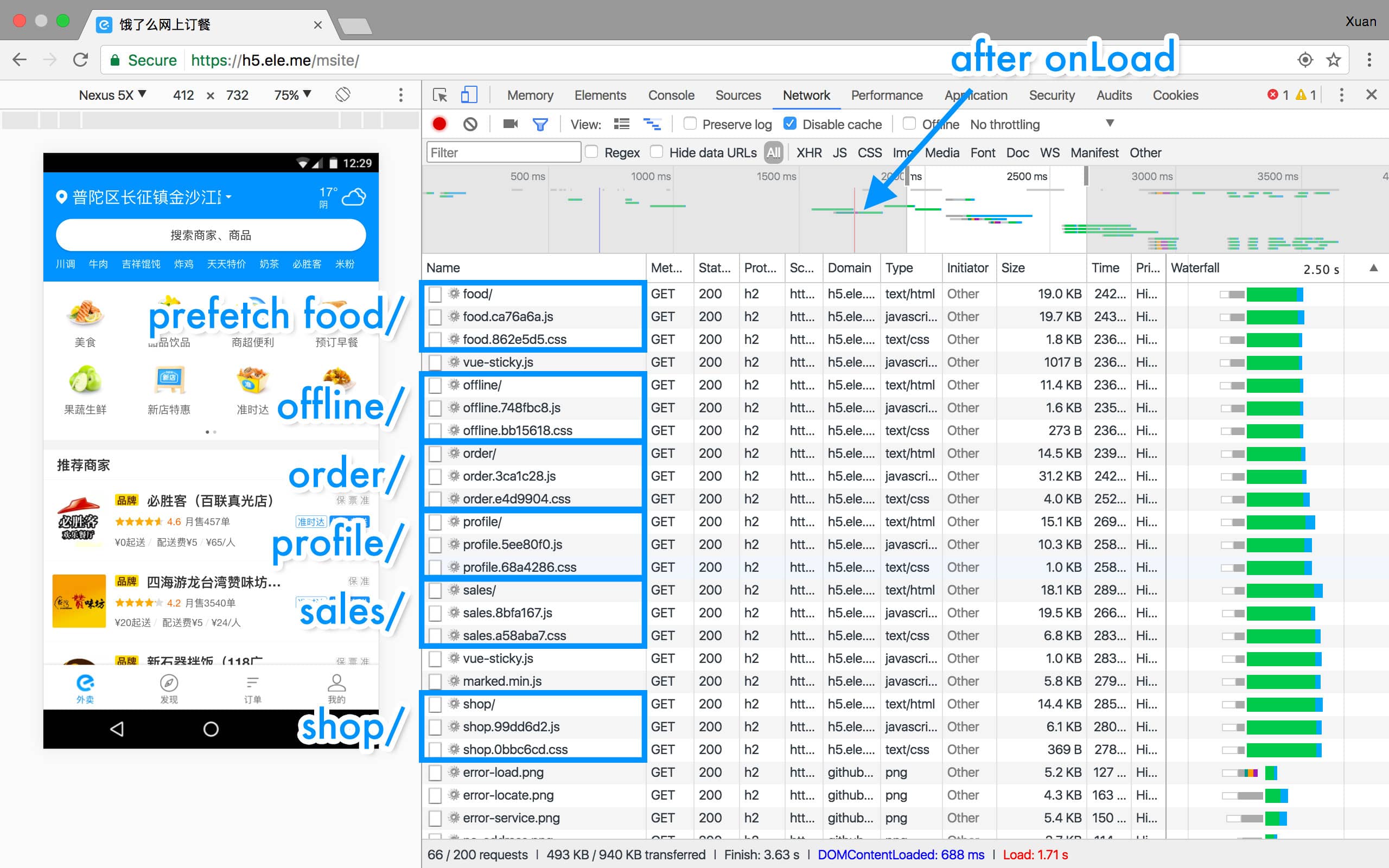
We already used Webpack in the build process to do .vue compilation and asset versioning, so we created a webpack plugin to help us collect dependencies into a "precache manifest" and generate a new Service Worker file after each build. This is pretty much like how SW-Precache works.
In fact, we only collect dependencies of routes we flagged as "Critical Route". You can think of them as "App Shell" or the "Installation Package" of our app. Once they are cached/installed successfully, our web app can boot up directly from cache and available offline. Routes that are "not critical" would be incrementally cached at runtime during the first visit. Thanks to the LRU cache policies and TTL invalidation mechanisms provided by SW-Toolbox, we have no worries about hitting the quota in the long run.
4. LAZY-load & instantiate remaining routes on demand
Lazy-loading and lazily instantiating remaining parts of the app is relatively challenging for SPA to achieve. It requires both code splitting and async importing. Fortunately, this is also a built-in feature of MPA model, in which routes are naturally separated.
Note that the lazy-loading can be done instantly if the requested route is already pre-cached in the Service Worker cache, no matter whether SPA or MPA is used. #ServiceWorkerAwesomeness
Surprisingly, we found Multi-page PWA is kinda naturally "PRPL"! MPA has already provided built-in support for "PRL", and the second "P" involving Service Worker can be easily fulfilled in any PWA.
So what about the end result?
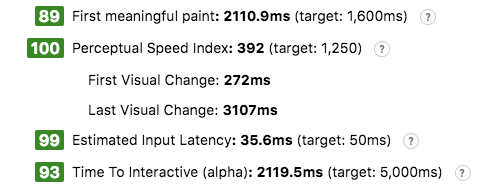
In Lighthouse simulation (3G & 5x Slower CPU), we made Time-To-Interactive around 2 seconds, and this was benchmarked on our HTTP1 test server.
The first visit is fast. The repeat visit with Service Worker is even faster. You can check out this video to see the huge difference between with or without Service Worker:
Did you see that? No, I mean the annoying blank screen. Even in the Service Worker one, the blank screen is still conspicuous during navigating. How can that be?
Multi-page Pitfall: Redo Everything!
Unlike SPA, changing routes in MPA means actual browser navigation happens: The previous page is discarded completely and the browser needs to redo everything for the next route: re-download resources, re-parse HTML, re-evaluate JavaScript, re-decode image data, re-layout the page and re-paint the screen, even though many of them could be shared across routes. All of this combined work requires significant computation and time.
So here is the profile (2x slower CPU simulated) of our entry page (most heavy one). Even though we can make Time-To-Interactive around 1s on repeat visit, our users can still feel it's too slow for just "switching a tab".
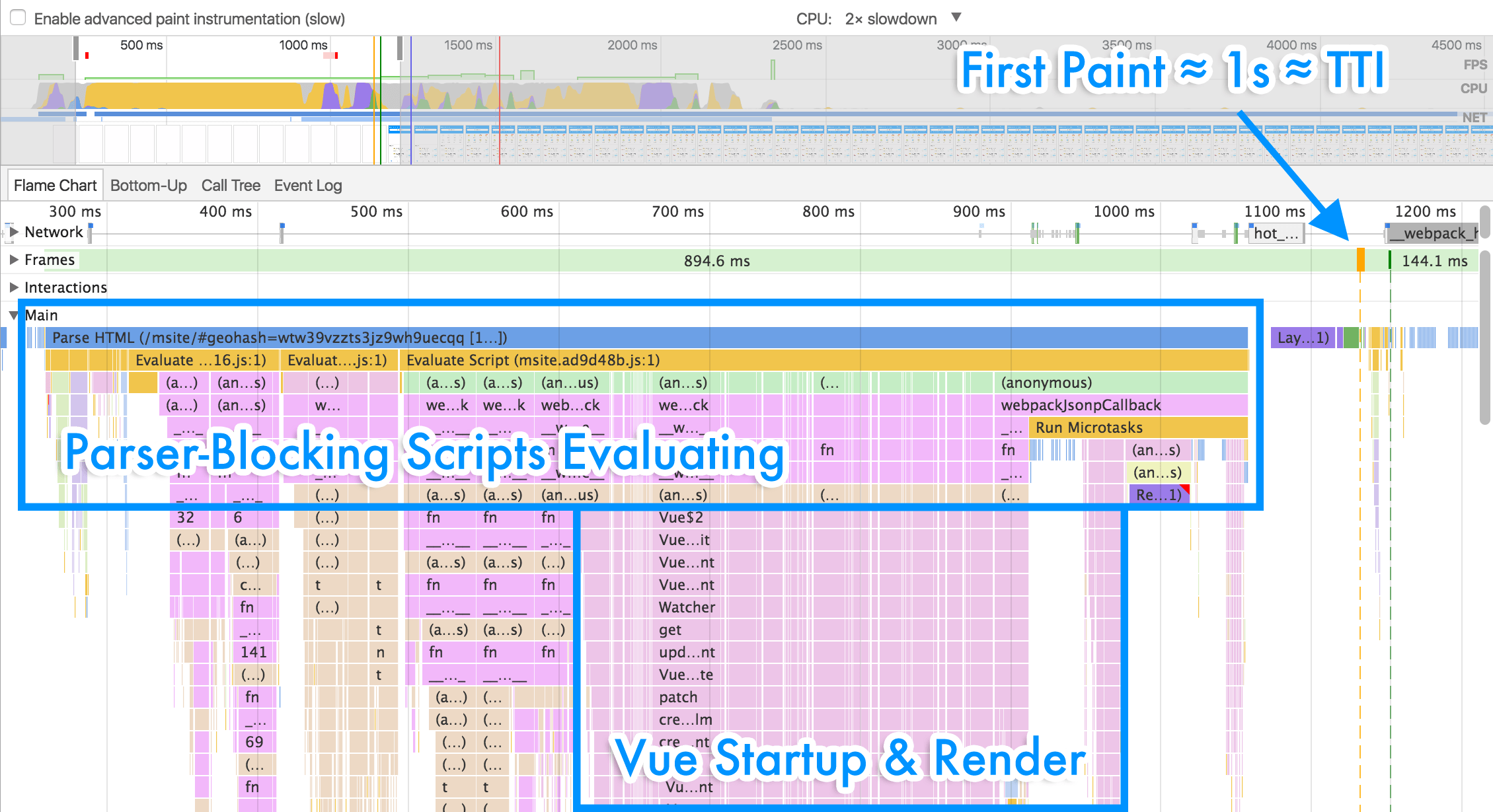
Huge JavaScript Re-Startup Cost
According to the profile, most of the time (900ms) before hitting the first paint is spent on evaluating JavaScript. Half is on dependencies including Vue Runtime, components, libraries etc., another half is on actual Vue starting-up and mounting. Because all UI rendering depends on JavaScript/Vue, all of the critical scripts remain guiltily parser-blocking. I'm by no means blaming JavaScript or Vue's overheads here. It's just a tradeoff when we need this layer of abstraction in engineering.
In SPA, JavaScript Start-up Cost is amortized during the whole lifecycle. Parsing/compiling for each script happens only once, and many heavy executions can happen only once. The big JavaScript objects like Vue's ViewModels and Virtual DOM can be kept in memory and reused as much as you want. This is not the case in MPA however.
Could Browser Caches Help?
Yes or no.
V8 introduced code caching, a way to store a local copy of compiled code so fetching, parsing and compilation could all be skipped next time. As @addyosmani mentioned in JavaScript Start-up Performance, scripts stored in Cache Storage via Service Worker could trigger code caching in just the first execution.
Another browser cache you might hear of is "Back-Forward Cache", or bfcache. The name varies, like Opera's "Fast History Navigation" or WebKit's "Page Cache". The idea is that browsers can keep the previous page live in memory, i.e. DOM/JS states, instead of destroying everything. In fact, this idea works very well for MPA. You can try any traditional Multi-page website in iOS Safari and observe instantaneous loading on back/forward. (With browser UI/Gesture or with hyperlink can have a slight difference though.)
Unfortunately, Chrome currently has no such in-memory bfcache, out of concern for memory consumption and its multi-process architecture. It just leverages HTTP disk cache to simplify the loading pipeline, almost everything still needs to be redone. More details and discussions can be seen here.
Striving for Perceived Performance
Although the reality is dark, we don't want to give up so easily. One optimization we try to do is to render DOM nodes/create Virtual DOM nodes as few as possible to improve the Time-To-Interactive. While another opportunity we see is to play tricks on perceived performance.
@owencm has written a great post "Reactive Web Design: The secret to building web apps that feel amazing" covering both "Instant loads with skeleton screens" and "Stable loads via predefined sizes on elements" to improve perceived performance and user experience. Yes, we actually used both.
What about showing the end result after these optimizations first, before entering the technical nitty-gritty? There you go!
Too fast to see the pulsing Skeleton Screen clearly? Here is a version showing what it looks like under a 10× slower CPU.
This is a much better UX, right? Even though we have slow navigation on slow devices, at least the UI is stable, consistent and always responding. So how did we get there?
Rendering Skeleton Screen with Vue at Build-Time
As you might have guessed, the Skeleton Screen that consists of markups, styles, and images is inlined into *.html of each route. So they can be cached by Service Worker, be loaded instantly, and be rendered independently of any JavaScript.
We don't want to manually craft each Skeleton Screen for each route. It's a tedious job and we have to manually sync every change between Skeleton Screens and the actual UI components (Yes we treat every route as just a Vue component). But think about it, Skeleton Screen is just a blank version of a page into which information is gradually loaded. What if we bake the Skeleton Screen into the actual UI component as just a loading state so we can render Skeleton Screen out directly from it without the issue of syncing?
Thanks to the versatility of Vue, we can actually realize it with Vue.js Server-Side Rendering. Instead of using it on a real server, we use it at build time to render Vue components to strings and inject them into HTML templates.
Fast Skeleton Painting...
Having markups in *.html doesn't mean that they will be painted fast, you have to make sure the Critical Rendering Path is optimized for that. Many developers believed that putting script tags in the end of the body is sufficient for getting content painted before executing scripts. This might be true for browsers supporting rendering an incomplete DOM tree (e.g. streaming render), but browsers might not do that on mobile, out of concern for slower hardware, battery, and heat. And even though we're told that script tags with async or defer are not parser-blocking, it doesn't mean we can get content painted before executing scripts in reality.
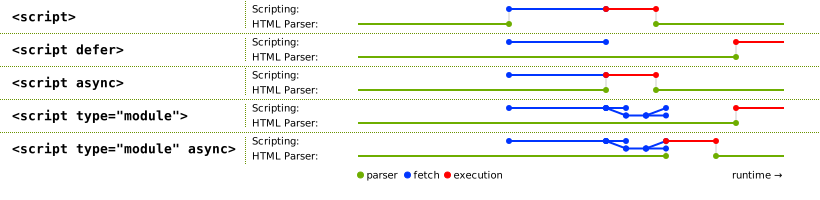
First I want to clarify it a little bit. According to the Scripting section of HTML (WHATWG living standard, the W3C's same here), async scripts would be evaluated as soon as they are available, thus potentially blocking parsing. Only defer (and not inlined) is specified to never block parsing. That's why Steve Souders ever posted "Prefer DEFER Over ASYNC". (defer has its own issue and we will cover it later.)
Then I want to say: A script not blocking parser could still block painting nonetheless. So here is a reduced test I wrote named "Minimal Multi-page PWA", or MMPWA, which basically renders 1000 list items within an async (and truly not parser-blocking) script to see if we can get the Skeleton Screen painted before scripts get executed. The profile below (over USB debugging on my real Nexus 5) shows my ignorance:
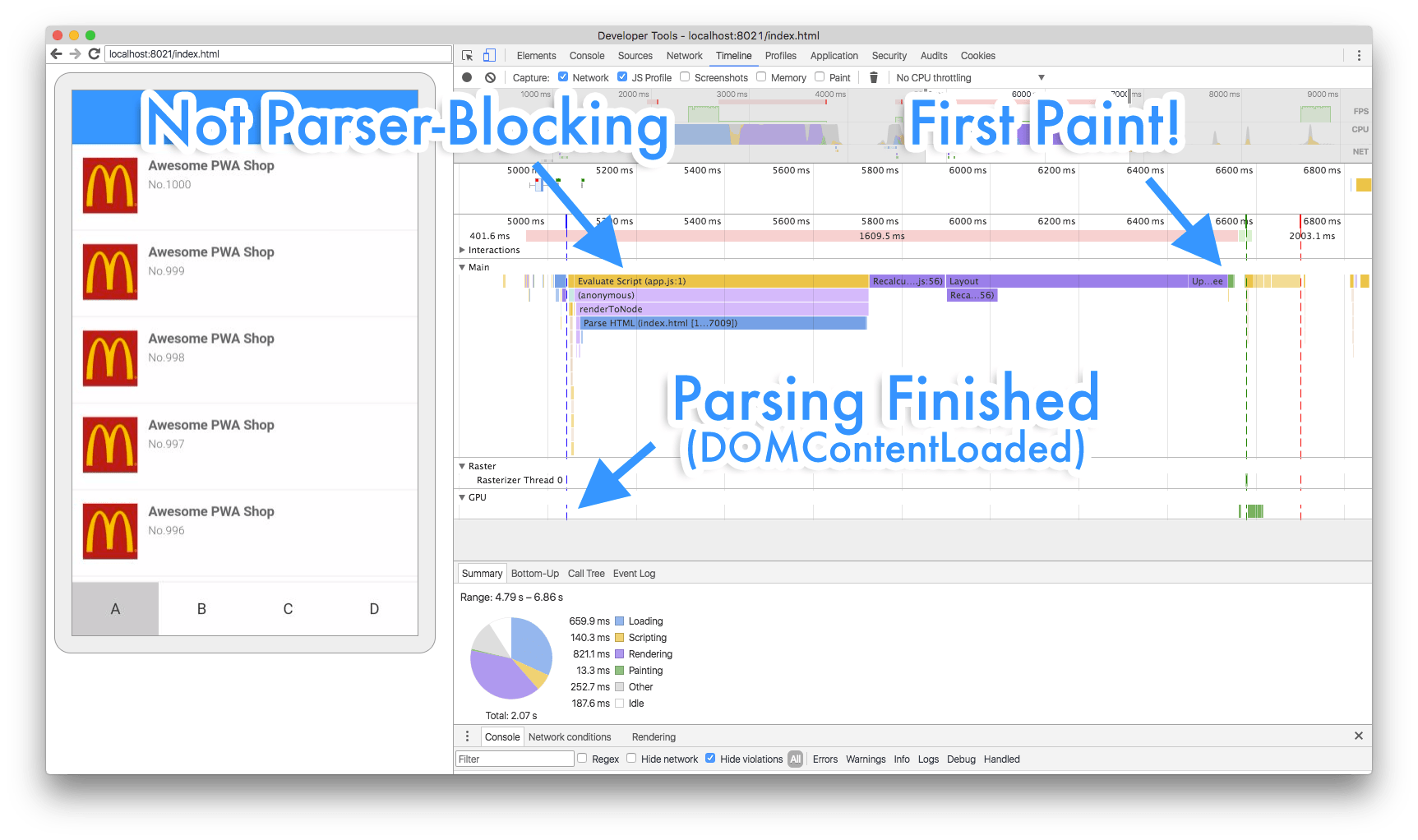
Yes, keep your mouth open. The first paint is blocked. I was also surprised here. The reason I guess is that if we touch DOM so quickly that the browser has still NOT finished previous painting job, our dear browser has to abort every pixel it has drawn, and has to wait until the current DOM manipulation task is finished and redo the rendering pipeline again. And this more often happens with a mobile device with a slower CPU/GPU.
Fast Skeleton Painting with setTimeout Hack
We indeed encountered this problem when testing our new beautiful Skeleton Screen. Perhaps Vue finishes its job and starts to mount nodes too fast ;). But anyway we have to make it slower, or rather lazier. So we try to put DOM manipulation things inside setTimeout(callback, 0), and it works like a charm!
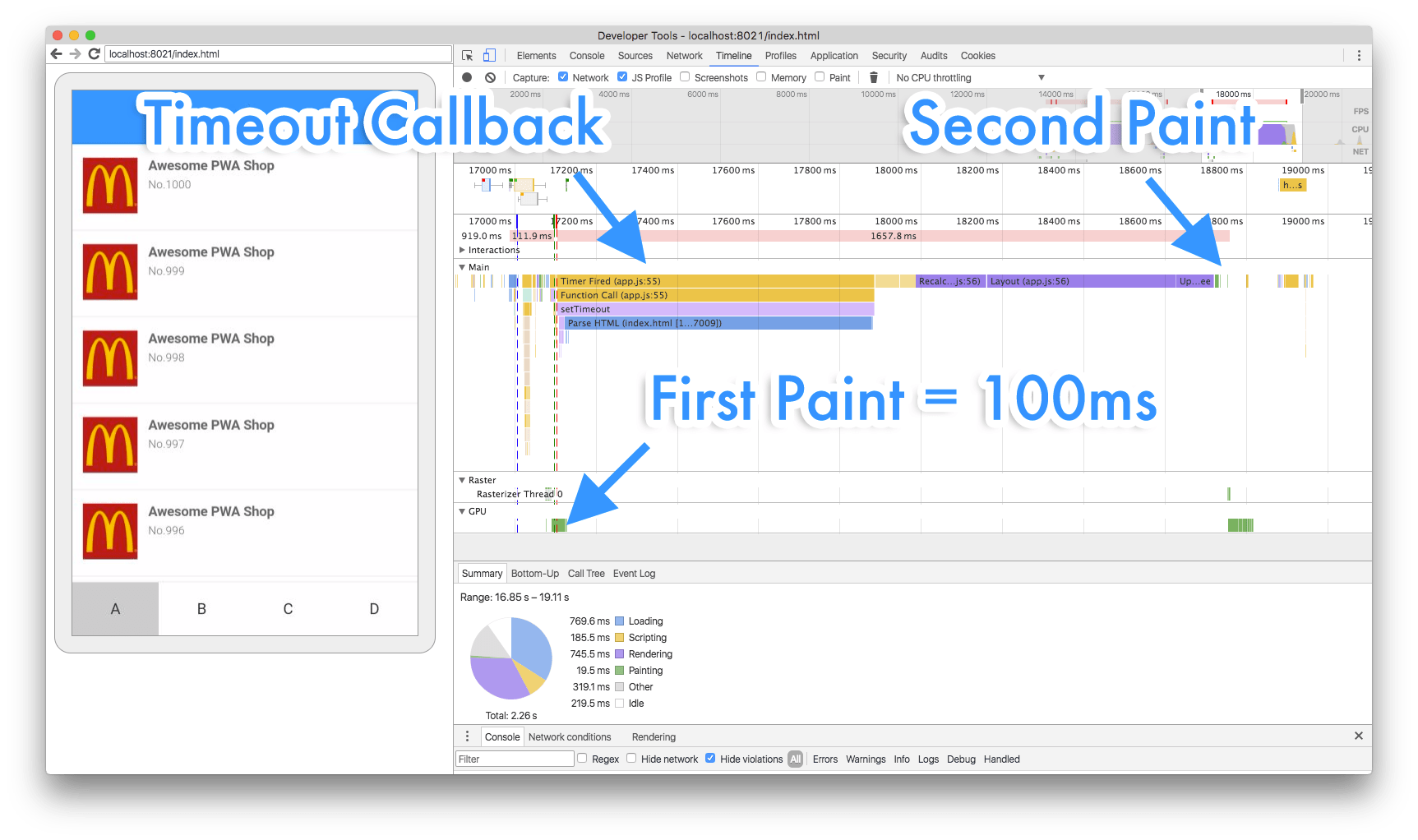
I think you may be curious about how this change performs in the wild, so I have refined MMPWA by rendering 5000 list items rather than 1000 to make the differences more obvious, and by designing it in an A/B testing manner. The code is on Github and the demo is live on huangxuan.me/mmpwa/. Here is also a video for loungers.
This famous setTimeout hack (a.k.a. Zero Delays) looks quite magic, but it is science™. If you are familiar with event loop, it just prevents this code from executing in the current loop by putting everything into the task queues with the Timer Callback, so the browser could breathe (update the rendering) in the main thread.
So we applied what we learned from MMPWA by putting new Vue() inside setTimeout and BOOM! We have Skeleton Screen painted consistently after every navigating! Here is the profile after all these optimizations.
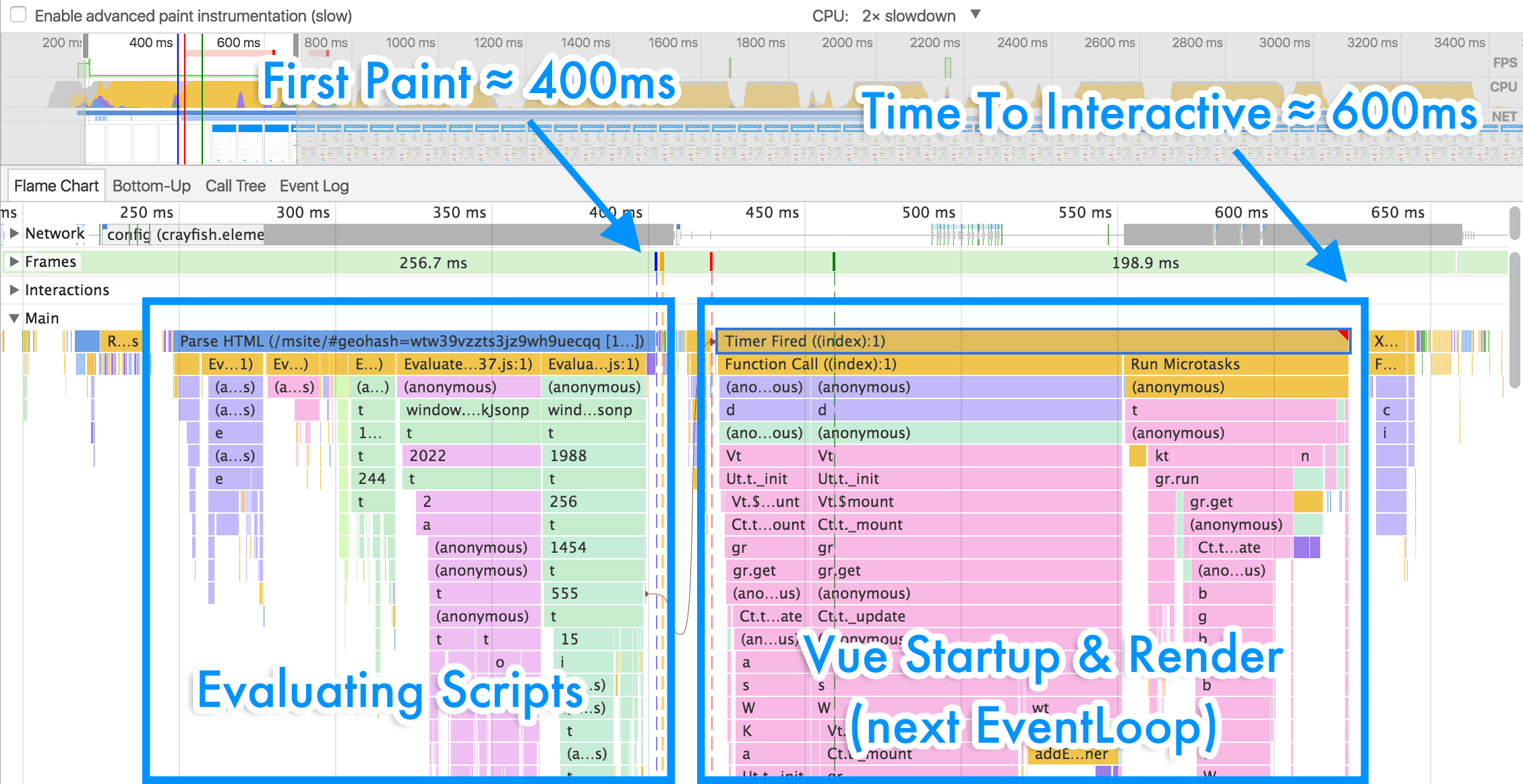
Huge improvements right? This time we hit First Paint (Skeleton Screen Paint) at 400ms and TTI at 600ms. You should really go back to have a before-after comparison in details.
One more thing that I deferred
But wait, why is there still a bunch of guiltily parser-blocking scripts? Are they all async? OK, ok. For historical reasons, we do keep some parser-blocking scripts, like lib-flexible, we couldn't get rid of it without a huge refactoring. But most of these blocking scripts are in fact defer. We expected that they can be executed after parsing and in order, however the profile kinda slap on my face. :(
Remember I said I would talk about one issue of defer previously? Yes, that's it. I have had a conversation with Jake Archibald and it turns out it might be a bug of Chrome when the deferred scripts are fully cached. Vote it at crbug!
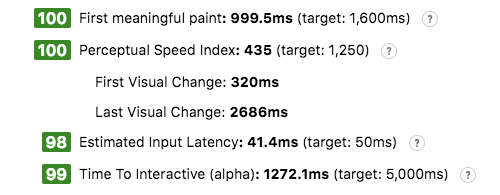
Similar improvements can be seen from Lighthouse (Under same server and network environment). A Pro Tip is you should always use lighthouse in a variable controlling approach.
Performance In the Real World
Alex Russell has given a very insightful talk on mobile web performance at Chrome Dev Summit 2016, talking about how hard can we build performant web applications on mobile devices. Highly recommended.
Chinese users tend to have a pretty powerful phone. The MI4 is shipped with a Snapdragon 801 (slightly out-performing the Nexus 5) but only costs $100. It’s affordable for at least 80% of our users, so we take it as a baseline.
Here is a video screen-recorded on my Nexus 5 showing switching between 4 tabs. The performance varies between tabs due to their variant scale. The heaviest one, the entry page, takes around 1s to hit real Time-To-Interactive on my Nexus 5.
FYI. This is surprisingly comparable to what I get from Chrome Simulation with 2x CPU throttling. With 5x throttling, this can take 2–3s to get TTI, horribly. (To be honest, I found that even under the same throttling, the results can vary drastically depending on my MacBook’s “mood”.)
Final Thoughts
This article is much longer than I could imagine. I really appreciate it if you could get this far. So what can we learn from it?
MPA still has some way to go
Jake Archibald ever said that "PWA !== SPA" at Chrome Dev Summit 2016. But the sad truth is that even though we have taken advantage of bleeding-edge technologies such as the "PRPL" pattern, Service Worker, App-Shell, and Skeleton Screen, there is still a distance between us and many Single Page PWAs just because we are Multi-page structured.
The web is extremely versatile. Static blogs, e-business sites, desktop-level software, all of them should be the first-class citizens of the web family. MPA might have things like a "bfcache API" and navigation transitions to catch up with SPAs in the future, but that is certainly not today.
PWA is Awesome No Matter What
Hey, I am not overblowing it. Even though we as a Multi-page PWA couldn't be as stunning and app-like as many Single Page PWAs are. The idea and technologies behind PWA still help us deliver a much better experience to our users on the web that hasn’t been possible before.
What PWA is trying to solve are some fundamental problems of the current web application model, such as its hard dependencies on network and browser UIs. That's why PWA can always be beneficial no matter what architecture or what framework you actually use. Addy Osmani would give a talk Production Progressive Web Apps With JavaScript Frameworks at this year's I/O (and I/O 16). You won’t want to miss it!
Finally, I’d love to thank:
- my colleagues YiSi Wang, GuangHui Ren, JiyinYiyong from Eleme
- collaborator Michael Yeung, Liam Spradlin and other collaborators from Google
- collaborators from UC/Tencent
And special thanks to
- invited reviewer, Evan You.
- Chrome “StackOverflow”, Jake Archibald.
Thank you all!
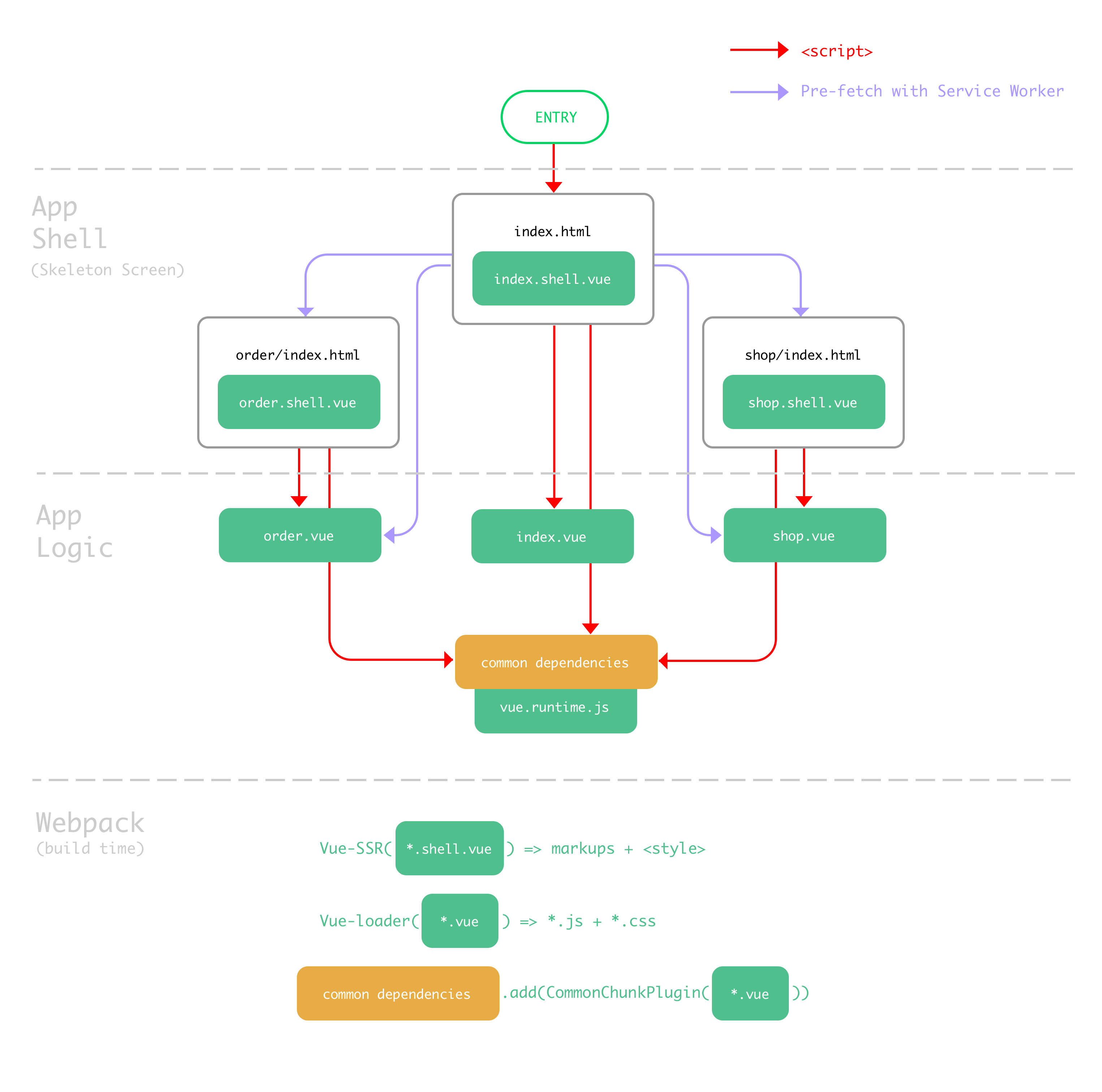
Appendix. Architecture Diagram
Read at Medium