The Next-Generation Web Application?
Over the last few years, web apps have taken on a bigger and bigger share of the work in software and on the internet. As software got more complex and more expensive to maintain, web technology, and client-side web technology above all, took off.
That includes front-end engineering built on Node.js; bundlers like Webpack and Rollup; transpilers like Babel and PostCSS; languages that compile to JavaScript like TypeScript and Elm; modern frameworks like React, Angular and Vue, and everything around them. There are also architectures like Isomorphic JavaScript and Universal JavaScript that mix server-side rendering with single-page apps. There has been no shortage of ideas.
Yet on mobile, web apps never got as popular as they are on the desktop. All these tools squeeze everything they can out of JavaScript, CSS layout, HTTP caching and browser APIs, and they've pushed the engineering of modern web apps, built on Ajax and responsive design, a long way. But without a native program helping the browser out, they still can't get past two limits the web platform puts on web apps: the latency of downloading the client software (the web page) over the network, and the experience problems that come from needing a browser to get in.
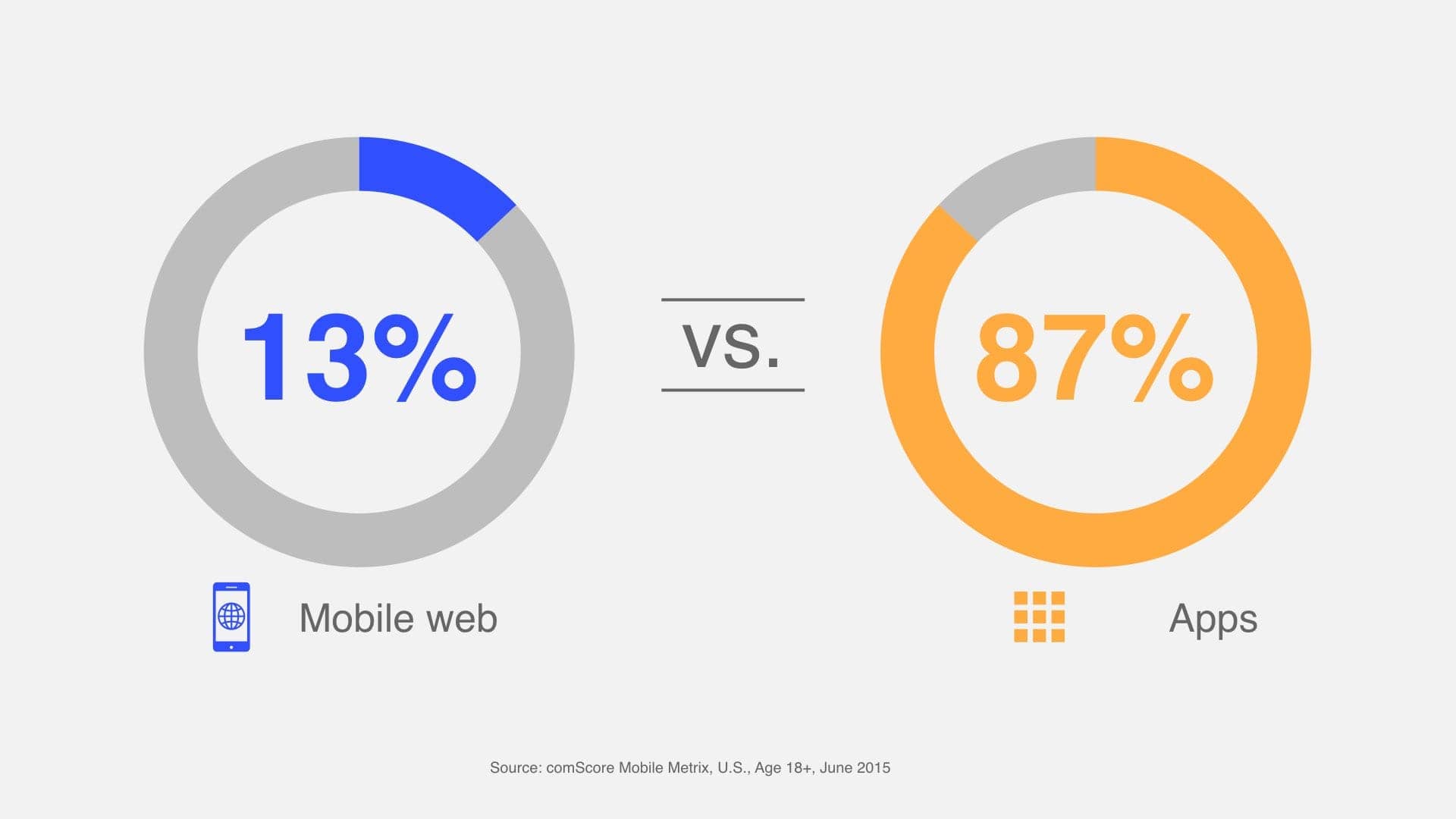 Usage time comparison between web and native apps on mobile platforms Image source: Google
On the desktop, the network is stable, the screen is big, and people are used to juggling many windows. There, both problems are outweighed by what web apps do well: nothing to install, there when you need them, never needing an update. On mobile, shaky connections and a whole new way of interacting make both problems much worse, and they've held web apps back badly. To users, native apps never show a blank white screen and sit neatly on the home screen, while web apps are apps inside another app (the browser), awkward to use and slower to load.
Progressive Web Apps (PWA from here on) and the technologies behind them finally give us some hope of fixing both problems at the platform level. Service Worker and Cache Storage make apps load much faster and can even let them work offline. The Web App Manifest describes a web app so it can be added to the home screen and run full screen like a native app. And the Push API and Notification API tie web apps more closely to the operating system, so they can send push notifications even when they aren't open.
What do you get when you put them together? Flipkart, often called "India's Alibaba," shut down its mobile website in 2015, and at the end of that year launched what became the most talked-about PWA of all: Flipkart Lite, the first PWA anywhere to run a business at scale. A week after launch it was on stage at Chrome Dev Summit 2015, and it blew me away. Here are a few illustrations for readers who can't watch the video:
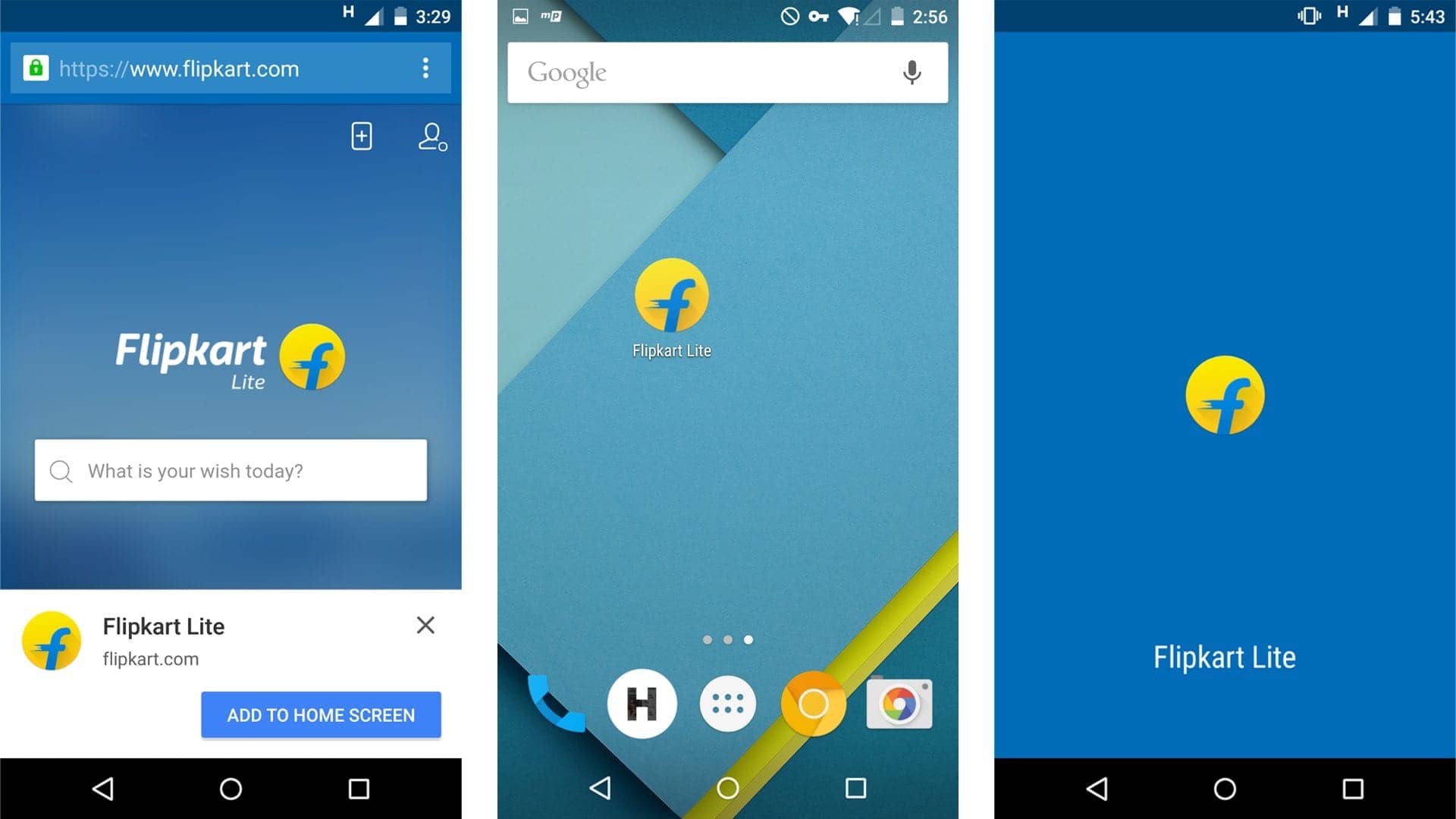 Image source: Hux & Medium.com
When the browser sees that a user could use Flipkart Lite, it asks: "Hey, want to add this to your home screen?" (Users can also do it themselves.) Flipkart Lite then gets its own icon on the home screen, just like a native app. It's not a plain bookmark either. Tap the icon and Flipkart Lite opens full screen, with no browser UI and with its own splash screen.
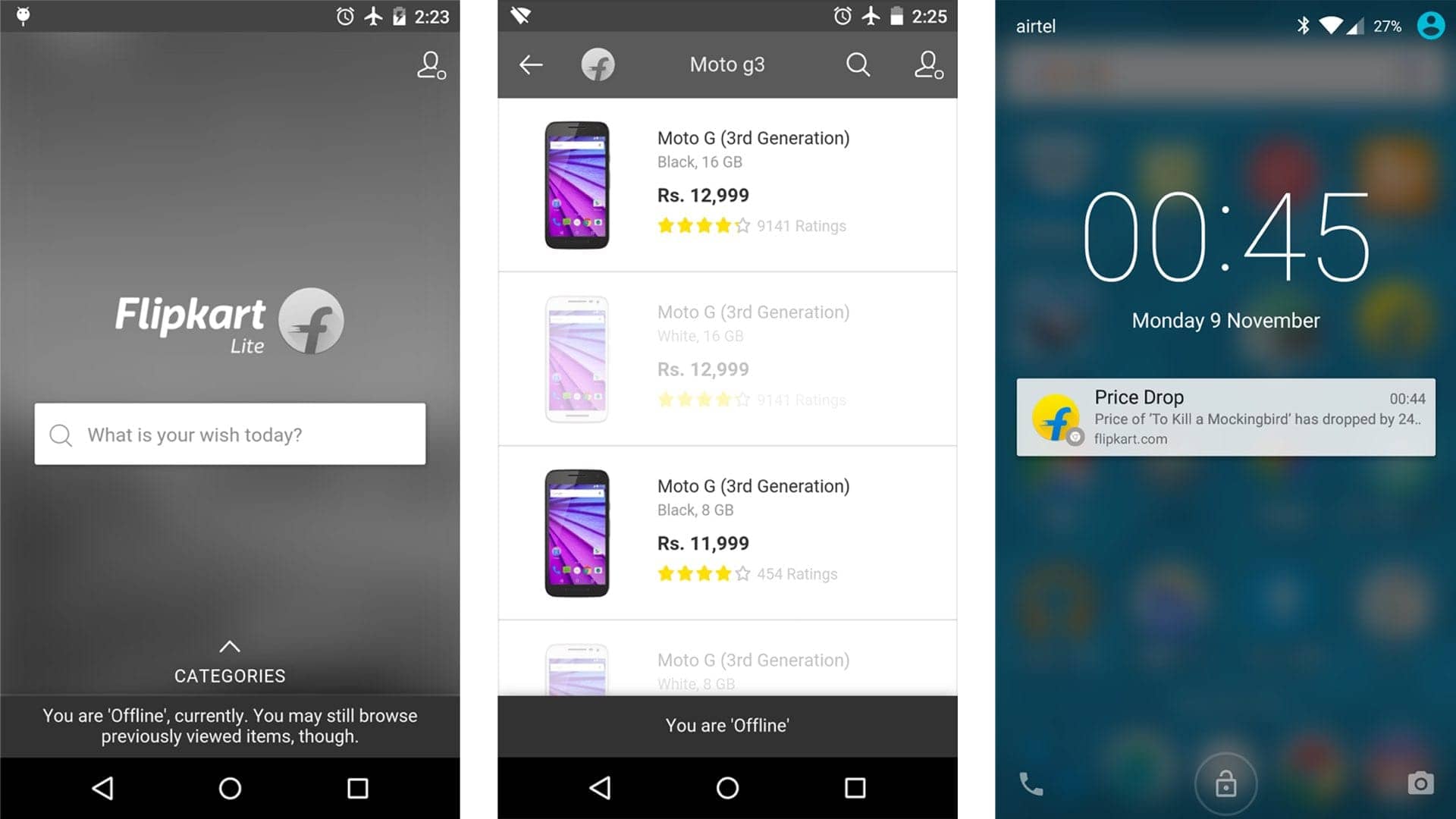 Image source: Hux & Medium.com
It gets better. With no network, Flipkart Lite still runs like a native app, and it even turns a stylish black and white. Products you've looked at before are cached and still work offline. When there's a sale or a promotion, Flipkart Lite sends a push notification, just like a native app, to bring you back.
No more worrying about network latency, and an entry point and a way to bring users back that are its own. With both problems solved at once, web apps get a second life on mobile. Web apps that follow the PWA model will become first-class citizens on mobile operating systems and start taking the fight back to native apps.
Even more exciting, at Chrome Dev Summit 2016 Chrome's VP of Engineering Darin Fisher showed some experiments the Chrome team was running: "Add to Home Screen" renamed to "Install," and installed PWAs that aren't just shortcuts on the home screen but stand level with native apps, in the app drawer and in system settings.
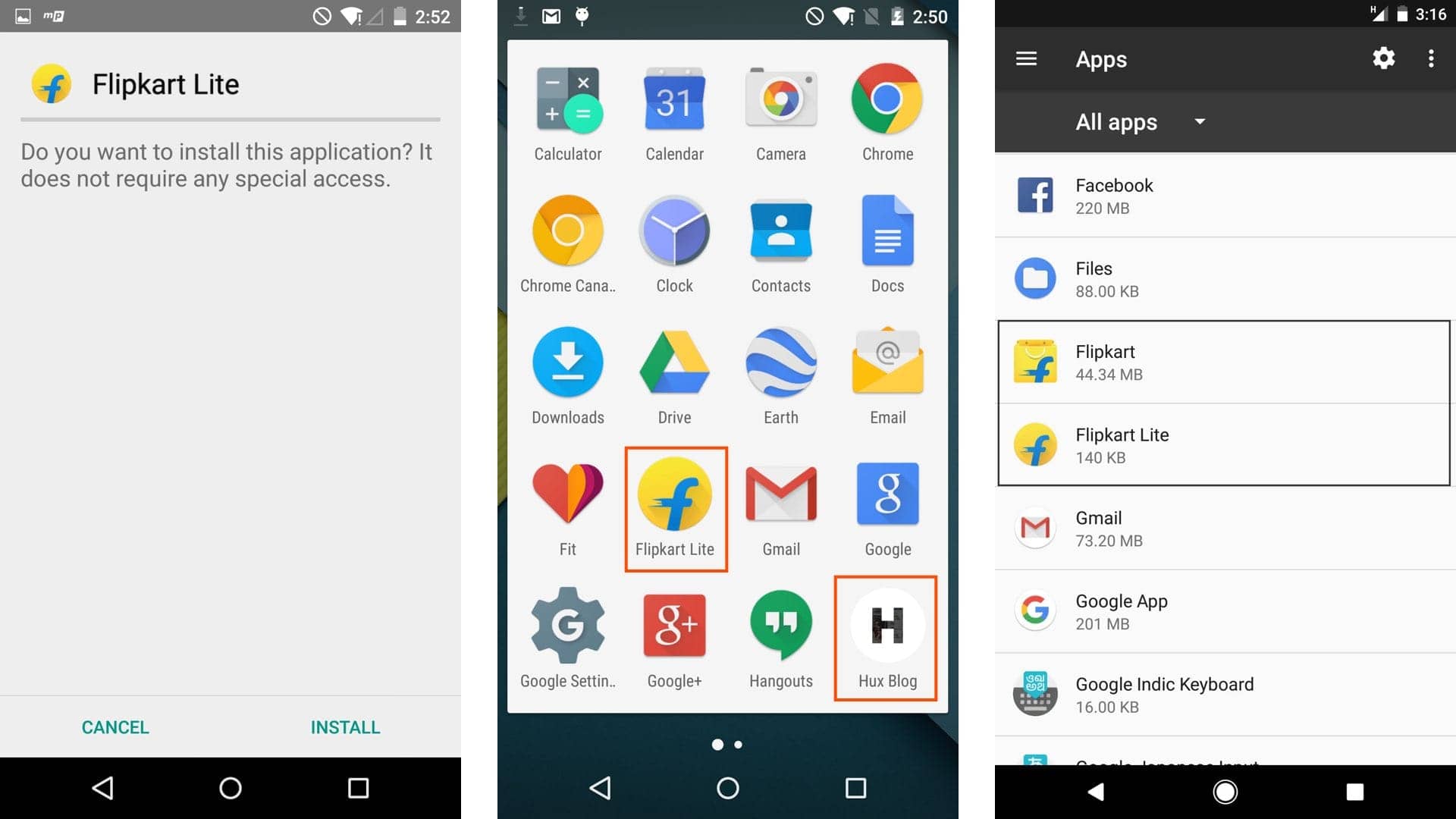 Image source: Hux & @adityapunjani
From left to right: an install prompt that looks like a native app's; Flipkart Lite and Hux Blog in the app drawer; and the settings screen listing the native Flipkart app next to the Flipkart Lite PWA (look how much smaller the PWA is).
I think PWA will be the third big revolution in how web apps work, after Ajax about 20 years ago and responsive design about 10 years ago, and it will take web apps into a whole new era.
Where the Key PWA Technologies Came From
Web App Manifest
The Web App Manifest gives the browser a web app's metadata, such as its name and icon URLs, in a single manifest file. The browser uses it when the app is added to the home screen or sends a push notification, for example, so the app fits into the OS better.
Trying to make web apps feel native on mobile goes back to 2008, when iOS 1.1.3 and iOS 2.1.0 added custom icons and full-screen launch.
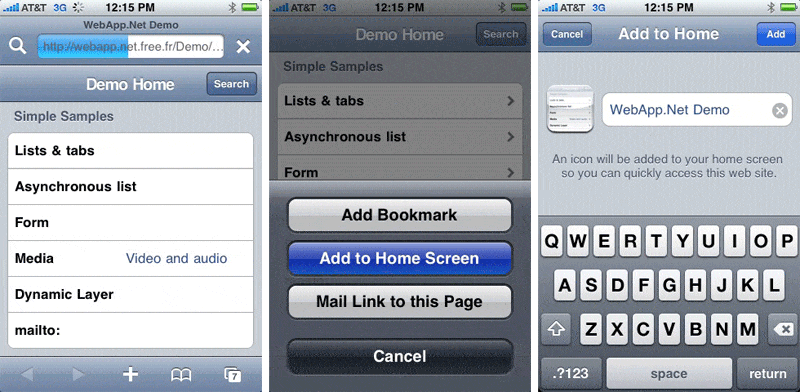 Image source: appleinsider.com
It didn't take long before more and more platforms started bolting their own extras onto web apps with <meta> and <link> tags, and the <head> got bloated fast:
<meta name="apple-mobile-web-app-capable" content="yes">
<meta name="apple-mobile-web-app-status-bar-style" content="black">
<meta name="apple-mobile-web-app-title" content="Lighten">

<meta name="mobile-web-app-capable" content="yes">
<meta name="theme-color" content="#000000">

<link rel="apple-touch-icon-precomposed" sizes="144x144" href="images/touch/apple-touch-icon-144x144-precomposed.png">
<link rel="apple-touch-icon-precomposed" sizes="114x114" href="images/touch/apple-touch-icon-114x114-precomposed.png">
<link rel="apple-touch-icon-precomposed" sizes="72x72" href="images/touch/apple-touch-icon-72x72-precomposed.png">
<link rel="apple-touch-icon-precomposed" href="images/touch/apple-touch-icon-57x57-precomposed.png">

<link rel="shortcut icon" sizes="196x196" href="images/touch/touch-icon-196x196.png">

<meta name="msapplication-TileImage" content="images/touch/ms-touch-icon-144x144-precomposed.png">
<meta name="msapplication-TileColor" content="#3372DF">

<link rel="shortcut icon" href="images/touch/touch-icon-57x57.png">
Clearly not elegant. The metadata was scattered and duplicated and hard to keep in sync, and tying it to the HTML made every future change to it harder to review. Around the same time, people started putting metadata in one manifest file instead: Chrome Extensions and Chrome Hosted Web Apps (2010) and the Firefox OS App Manifest (2011) used JSON, while Cordova and Windows Pinned Sites used XML.
In 2013 the W3C WebApps Working Group started standardizing a JSON manifest. It published a First Public Working Draft by the end of that year, and that draft grew into today's W3C Web App Manifest:
{
  "short_name": "Manifest Sample",
  "name": "Web Application Manifest Sample",
  "icons": [{
      "src": "launcher-icon-2x.png",
      "sizes": "96x96",
      "type": "image/png"
   }],
  "scope": "/sample/",
  "start_url": "/sample/index.html",
  "display": "standalone",
  "orientation": "landscape"
  "theme_color": "#000",
  "background_color": "#fff",
}
<link rel="manifest" href="/manifest.json">You'll recognize name, icons and display. Most of the new fields give web apps things they always wanted and couldn't do (or could only hack together):
scope: The range of URLs that belong to the web app. Links outside it open in the browser instead of staying in the PWA.start_url: The page a PWA opens on. If you add any article from Hux Blog to your home screen, launching it from there always takes you to Hux Blog's front page.orientation: At last, we can lock the screen orientation (tears of joy...)theme_color/background_color: The theme and background colors, used to style the parts of the OS UI that can be customized, like Android's status bar and task switcher.
There are plenty more fields, like related_applications for pointing to a matching native app, but I won't list them all. The Web App Manifest is a PWA's ID card, and it carries the job of fitting web apps into the OS, so it will keep growing as web apps need more.
Service Worker
The whole web app model we have today assumes the user is online, which is why you end up playing the dinosaur game the moment your connection drops. Service Worker is the web's third attempt, at least, at making web apps work offline.
The story starts with Google Gears in 2007. Google wanted Gmail, YouTube, Google Reader and its other web apps to store data locally and work offline, so it built a browser extension that gave web apps more power. Gears supported IE 6, Safari 3, Firefox 1.5 and others. Remember, Chrome didn't exist yet.
With the Gears API, you got offline support by handing a cache manifest to the LocalServer module:
// Somewhere in your javascript
var localServer = google.gears.factory.create("bata.localserver");
var store = localServer.createManagedStore(STORE_NAME);
store.manifestUrl = "manifest.json"// manifest.json
{
"betaManifestVersion": 1,
"version": "1.0",
"entries": [
{ "url": "index.html" },
{ "url": "main.js" }
]
}Look familiar? A bit like Application Cache in the HTML5 spec?
<html manifest="cache.appcache">CACHE MANIFEST
CACHE:
index.html
main.jsThat's right. Gears' LocalServer became what we know as App Cache. Around 2008 the W3C started standardizing Gears. Besides LocalServer, its WorkerPool module (for parallel computation) became Web Workers, and its Database module (a local database with SQL) became Web SQL Database, which was later deprecated.
HTML5 App Cache, the second attempt at offline web apps, did serve plenty of them, including Google Docs, Evan You's early project HTML5 Clear, and FT.com (the Financial Times), whose iOS apps have always been web apps. So what was left for Service Worker to do?
Well, if App Cache hadn't been so badly designed that you couldn't program it, couldn't clear its cache, had next to no routing, and had nothing to reach for when things went wrong, maybe we really wouldn't need Service Worker. App Cache has been removed from the just-finalized HTML5.1. To save the web, the W3C didn't mind slapping its own face...
Which brings us to Service Worker. Put simply, a Service Worker is a Web Worker you can program. It sits between the browser and the network like a proxy on the client, and it can intercept, handle and answer any HTTP request that passes through. Together with the Cache Storage API that came with it, you can manage caching file by file however you like, so a Service Worker can serve your web app's resources from cache, even offline.
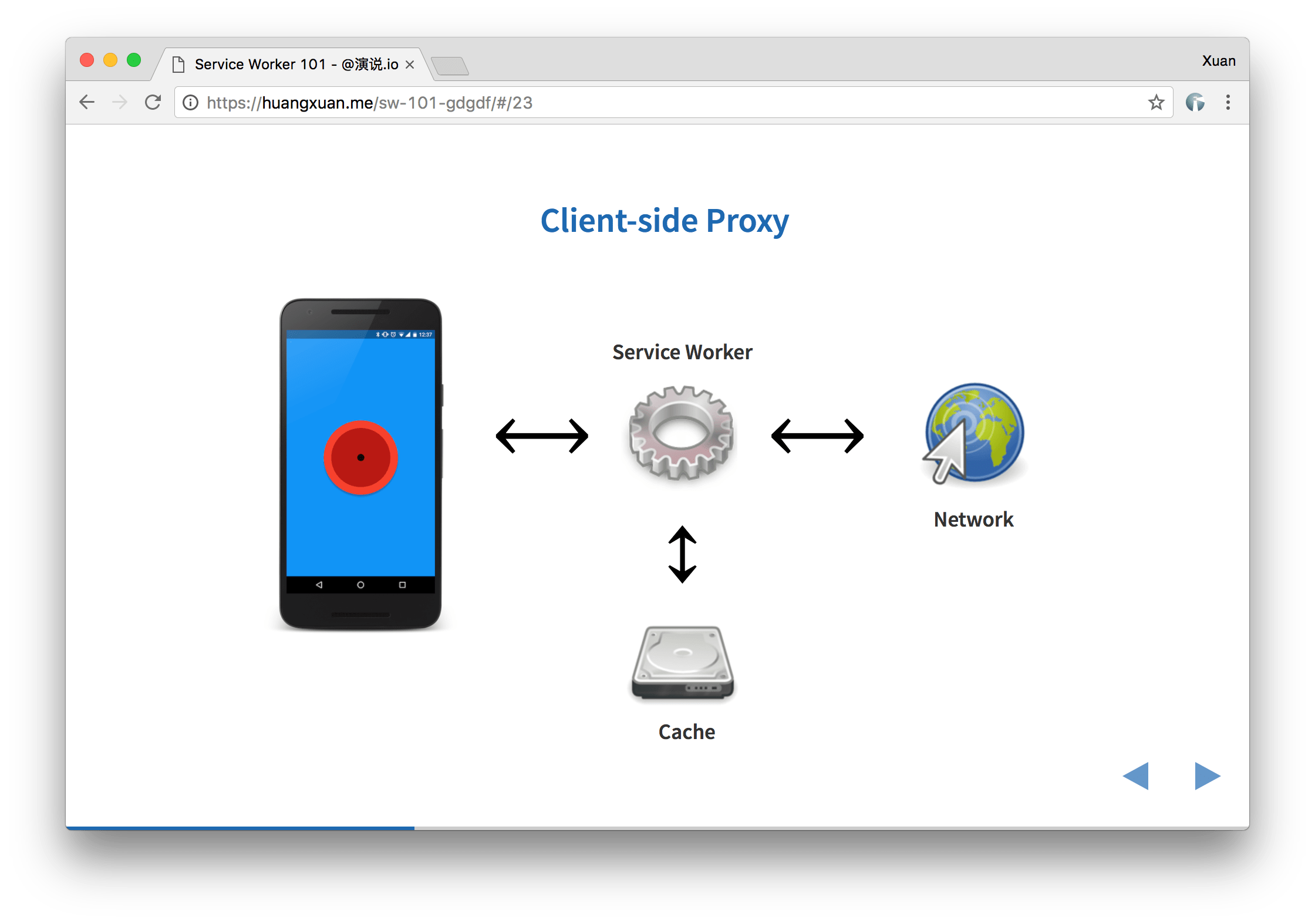 Service Worker acts like a proxy running on the client side
For example, we can register a Service Worker for a page foo.html that takes over every HTTP request foo.html makes and answers each one with Hello World! and no Content-Type header:
// sw.js
self.onfetch = (e) => {
  e.respondWith(new Response('Hello World!'))
}
Service Worker was first shown at Google I/O 2014 and is currently a W3C Working Draft. Its design learned from App Cache's failure and gives you, the developer, full control. It also borrowed from Chrome's years of experience with extensions (Background Pages and Event Pages): it only wakes up when an event arrives, which saves a lot of power compared with running in the background all the time. The fetch event above is one of the events that wake it.
 The Service Worker lifecycle
Besides functional events like fetch, Service Worker has lifecycle events such as install and activate. During install, for example, we can download everything our web app needs ahead of time and put it in Cache Storage:
// sw.js
self.oninstall = (e) => {
  e.waitUntil(
    caches.open('installation')
      .then(cache =>  cache.addAll([
        './',
        './styles.css',
        './script.js'
      ]))
  )
});
Then, when the user is offline and the network can't be reached, we can start the app from the cache:
//sw.js
self.onfetch = (e) => {
  const fetched = fetch(e.request)
  const cached = caches.match(e.request)

  e.respondWith(
    fetched.catch(_ => cached)
  )
}
Service Worker is a fairly low-level, very programmable API with a lot of moving parts, which makes it very flexible and powerful. This post only scratches the surface. For security, a Service Worker can only be registered by a site served over HTTPS, so nobody in the middle can abuse it. This year at GDG Beijing's DevFest I gave a talk, Service Worker 101, that goes into more involved caching strategies like network first, cache first, and racing the network against the cache, with learning resources and example code.
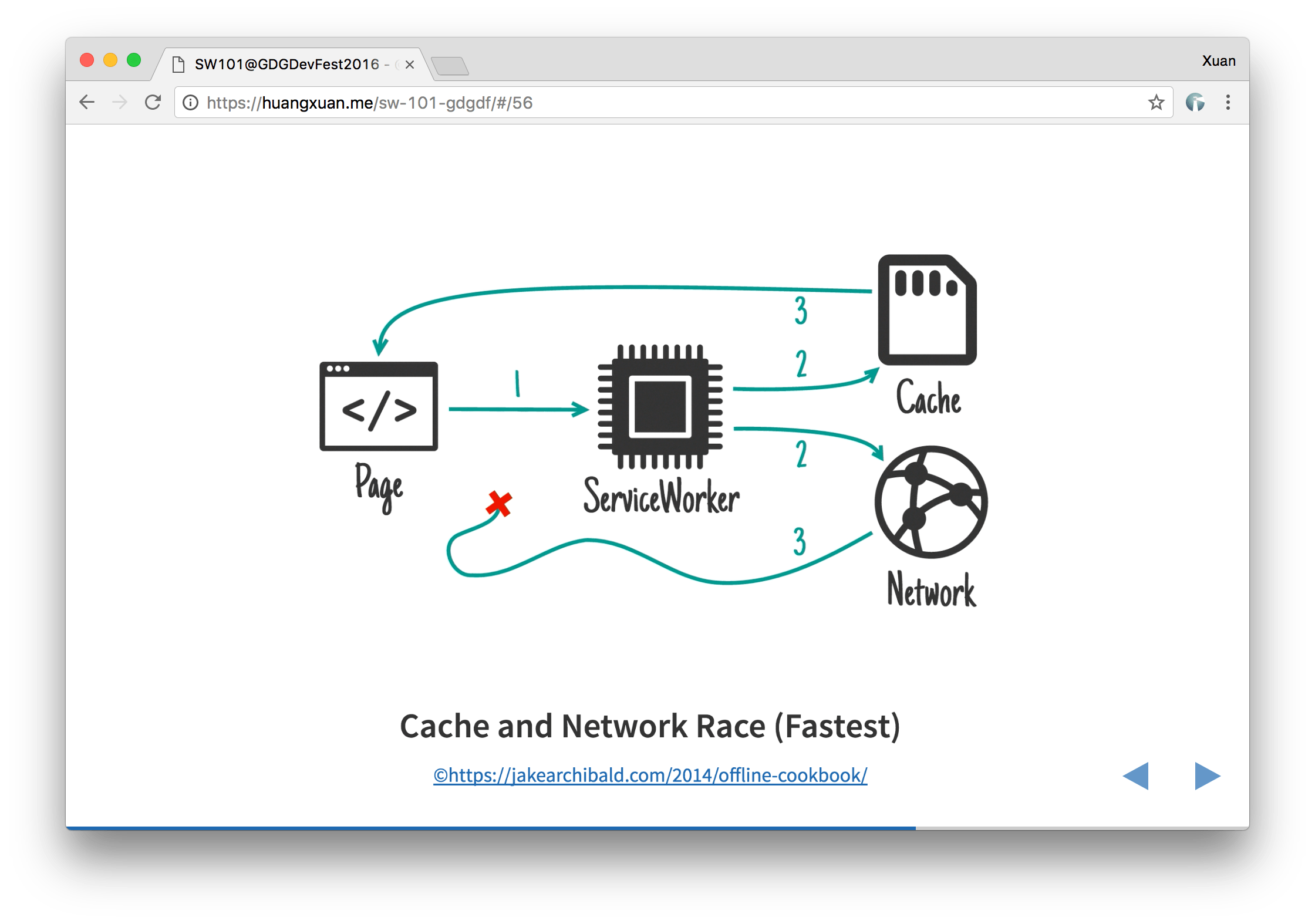 One of Service Worker's caching strategies: racing network requests against cache reads
You can also visit my blog, Hux Blog, in a browser that supports PWA to see a Service Worker at work. Every page you've visited is cached and works offline, and pages you haven't visited show a custom offline page.
As I see it, Service Worker is to PWA what XMLHttpRequest was to Ajax and media queries were to responsive design. It's the key technology that makes PWA the next-generation web app model. A Service Worker can talk to most non-DOM APIs, including IndexedDB and Streams, so there's almost no limit to what it can do. I'm close to certain that Service Worker will be one of the most fought-over parts of client-side web engineering for the next ten years, and that it will bring an offline-first revolution in architecture.
Push Notification
PWA push notifications use two separate APIs that work together, one for the push and one for the notification.
Many people already know the Notification API. It handles everything about the notification itself: asking permission, handing notifications to the OS, notification types and sounds, and callbacks for when a notification is clicked or dismissed. Plenty of big sites in China and elsewhere already use it, mostly on the desktop. Chromium first proposed it around 2010 and shipped it with a webkitNotifications prefix. Standardization started in 2011. Safari 6 (Mac OS X 10.8+) supported it in 2012, it became a W3C Recommendation in 2015, and once Edge added it in 2016, every desktop browser (Chrome, Edge, Firefox, Opera, Safari) supported web notifications.
The Push API lets push services send messages to web apps. It defines how a web app subscribes to a push service, how it handles incoming messages, and how the web app, the app server and the push service authenticate and encrypt what they send each other. The Push API doesn't need the web app or the browser UI to be running, so a background process can receive a push message and show a notification through the Notification API even when neither is open. Worth noting: in 2013, Mac OS X 10.9 Mavericks and Safari 7 shipped Apple's own push support, Safari Push Notifications, built on APNS.
In a PWA, a Service Worker runs in the background and responds to push events from the Push API, and uses the Notification API to create and handle notifications:
// sw.js
self.addEventListener('push', event => {
  event.waitUntil(
    // Process the event and display a notification.
    self.registration.showNotification("Hey!")
  );
});

self.addEventListener('notificationclick', event => {
  // Do something with the event
  event.notification.close();
});

self.addEventListener('notificationclose', event => {
  // Do something with the event
});
I've always said less about push notifications in my talks. Partly that's because the Push API is still an Editor's Draft, and partly it's because browser support for push service protocols isn't mature yet. Before Chromium 52, Chrome (and other Blink browsers) could only push through Google's own GCM/FCM. The good news is that after Firefox 44, Chrome 52 and Opera 39 quickly implemented the Web Push Protocol, which the IETF is standardizing.
If you already use Google's cloud services (like Firebase) and your users are mostly outside China, adding GCM/FCM push notifications to your web app isn't hard. Google Developers has a series of articles on it, and many companies outside China already use it.
From Hybrid to PWA, from Closed to Open
In 2008 the mobile era arrived, people started predicting the mobile web's decline, and browsers couldn't keep up. Brian Leroux and others at Nitobi created PhoneGap as a polyfill to close the "gap" between browsers and phones, and the era of hybrid apps began.
Over the next few years came Adobe AIR, Windows Runtime Apps, Chrome Apps, Firefox OS, WebOS, Cordova/PhoneGap, Electron, and in China, WeChat and Taobao. Countless hybrid approaches let web developers keep using web technology while doing what only native apps could: calling device and OS APIs, feeling more like an app, and getting into the app stores.
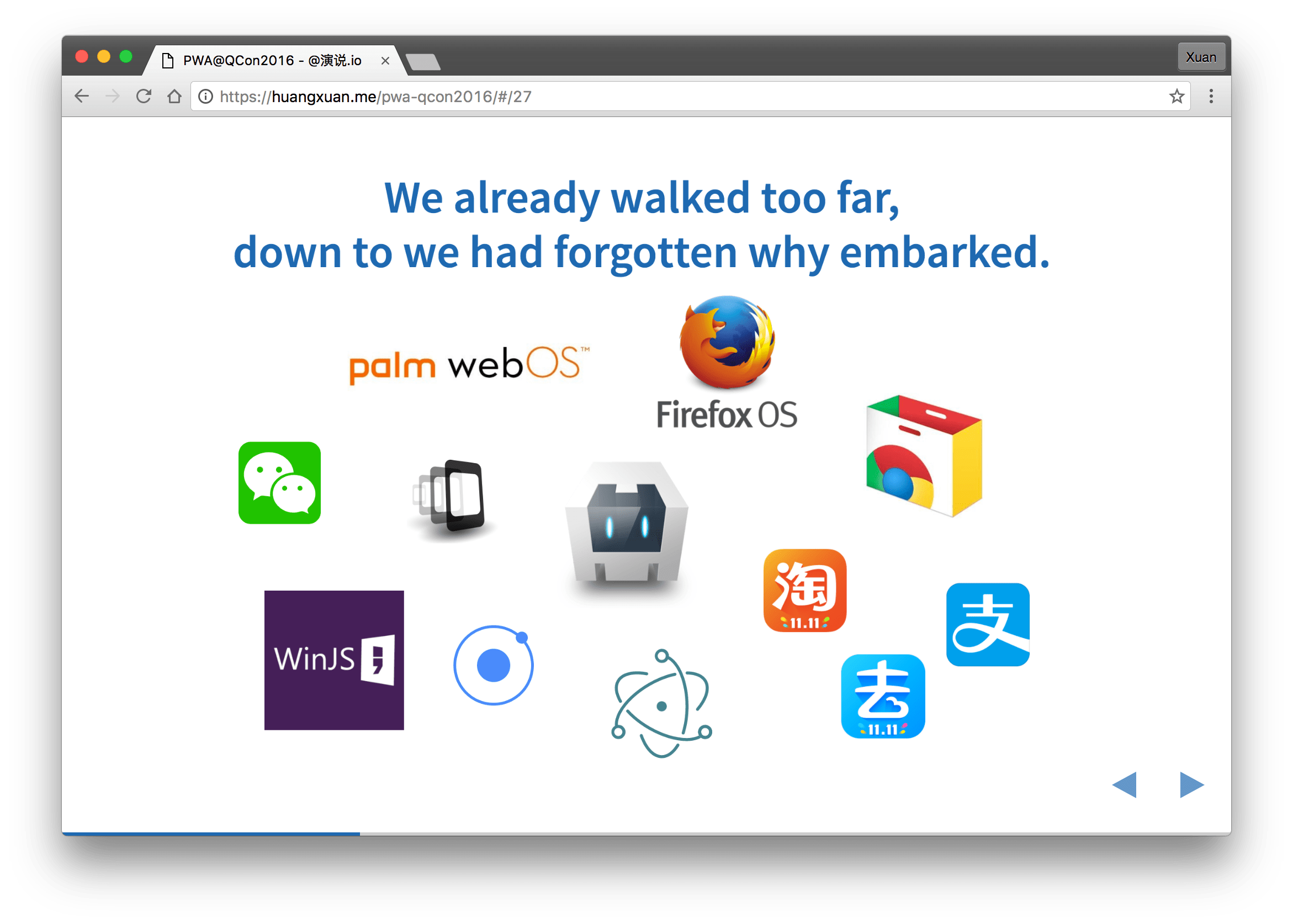 The many hybrid approaches
PWA is an umbrella term, and what sets it apart from all those attempts to power up web apps with proprietary APIs is this: every technology it's built on has been standardized, or is being standardized, by the IETF, ECMA, W3C or WHATWG. Barring surprises, all of them will be open web standards, supported in every browser on every platform before long. We can finally leave the app stores' walled gardens and go back to the open, free land that belongs to the web.
And as you may have noticed above, the drafts behind each PWA technology were contributed or influenced by the very browser vendors and developers who built those proprietary platforms. So PWA isn't backed by one or two companies. It's backed by the whole web community and the whole body of web standards. That open, decentralized force is what made the World Wide Web the most cross-platform application platform there is, and very nearly the only one that works everywhere.
Keep the web's open soul, skip the hybrid detour into the app store, and let web apps step out of browser tabs, a little at a time, until users see them as apps. That's what Alex Russell set out to do when he proposed PWA in 2015.
And because the web is one whole, PWA can use much more than what I've listed: Ajax, responsive design, JavaScript frameworks, ECMAScript Next, CSS Next, Houdini, IndexedDB, device APIs, Web Bluetooth, WebSockets, Web Payments, the incubating Background Sync API, Streams, WebVR... Everything from 27 years of the open web, and everything it builds next, fits PWA perfectly.
Having Your Cake and Eating It Too
After years of trying things, the industry seemed to settle the "web app vs. native app" question like this:
- Web apps are the fish: fast to iterate, cheap to acquire users, very cross-platform, a weaker experience, cheap to build. Good for acquisition.
- Native apps are the bear's paw (a Chinese delicacy): slow to iterate, expensive to acquire users, not very cross-platform, a better experience, expensive to build. Good for retention.
Users do spend much more time in native apps than on the web, but 80% of that time goes to their top five apps. Half of U.S. smartphone users download no new apps in a typical month, while they visit around 100 websites a month, and 60% of the apps on Google Play have never been downloaded. So the whole industry runs the same play: trade the fish for the bear's paw. Take my former employer, Alibaba Travel (Fliggy). Its web app lives in all sorts of Alibaba channels to give you a great first experience, and once you're hooked, it nudges you into downloading the native app.
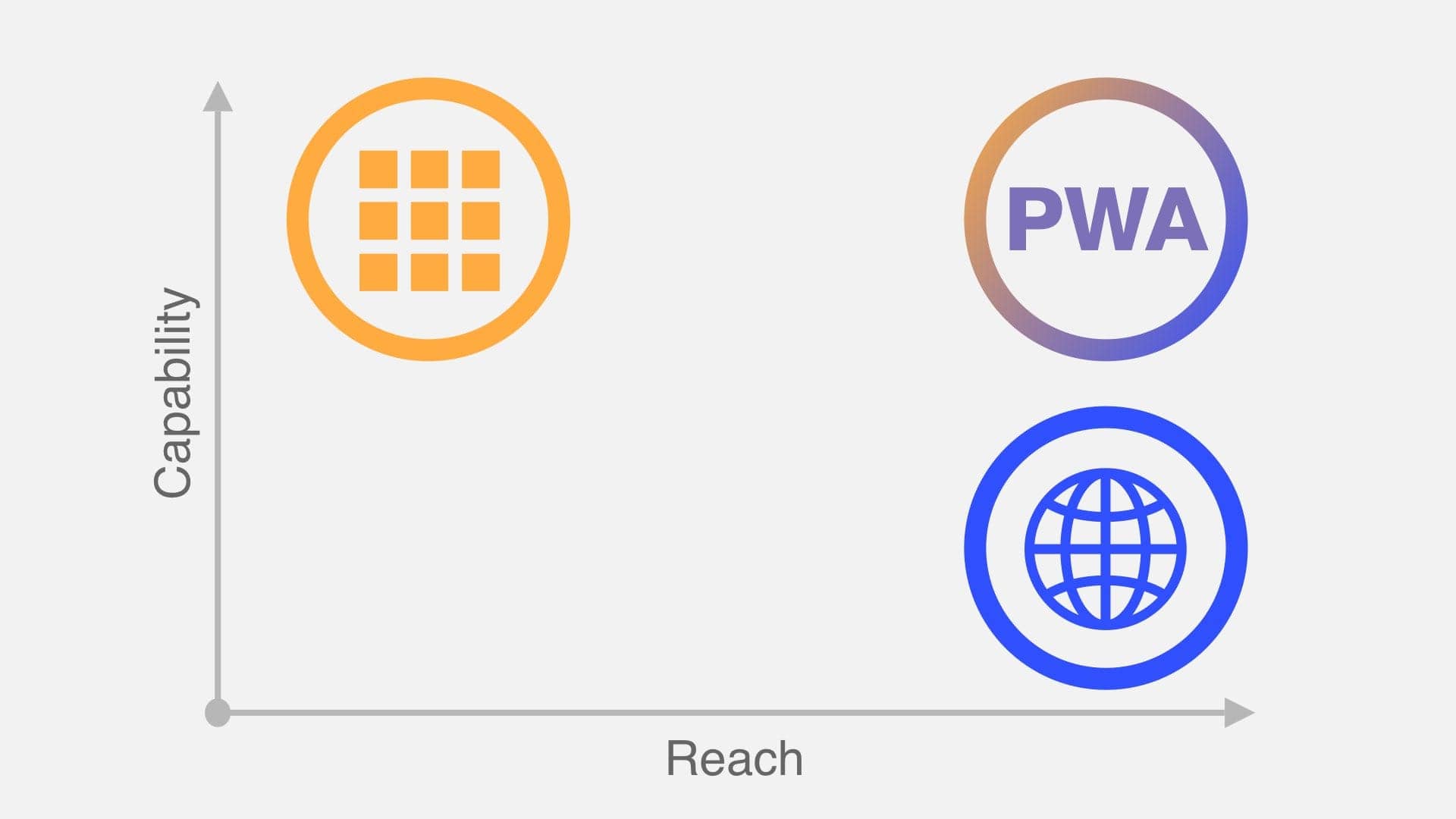 Native apps, contemporary Web, and PWA. Image source: Hux & Google
PWA lets you have both the fish and the bear's paw. It has what's good about web apps and what's good about native apps, plus some strengths of its own: browser, then Add to Home Screen or Install, then a PWA that feels native, then push notifications that bring you back to it. The whole loop from acquisition to retention is built in.
PWA also keeps two other big advantages of web apps: you don't have to download and install tens of megabytes before you can use it, and you don't need app store review to ship a new version. You could call PWAs streamable apps, or evergreen apps.
Is the Future Here?
Whenever I talk about PWA, the two questions I least like answering are "Is PWA widely supported yet?" and "How does PWA compare to technologies A, B, C, D, E, F and G?" But there's no getting around them.
How Well Is PWA Supported?
Asking whether PWA is supported really means asking whether its key technologies are. By engine: Blink (Chrome, Opera, Samsung Internet and others) and Gecko (Firefox) already implement everything PWA needs and are exploring what comes next. EdgeHTML (Edge) could hardly be keener, with every feature already "in development". The big holdout is WebKit (Safari), especially on iOS, which supports none of the four APIs above, and because of platform rules, third-party browsers on iOS can't support them either. (What's that? IE, you say?)
Don't lose heart, though. WebKit's five-year plan from 2015 mentions Service Worker, it recently implemented Request, Response and Fetch, which Service Worker depends on, and it lists both Service Worker and the Web App Manifest as "under consideration". For comparison, WebKit marked HTML Imports from Web Components as flat-out "not considering"... (So did Firefox, to be fair.)
And since the web has always believed in progressive enhancement and graceful degradation, a PWA still runs fine on iOS. When the Washington Post moved to a PWA, engagement went up 5x, and not only on Android but on iOS too (whether or not their old site was just that bad). Even if iOS doesn't support PWA yet, it doesn't matter much, and there's every reason to think PWA will come to iOS soon.
PWA vs. Everything Else
He Shijun (a respected figure in China's front-end community) once said: "Between pure web and pure native, there are many points along the way." When choosing a technology for a mobile app, besides web and native there are hybrids of every degree, and this year, a flood of JS-to-native solutions.
I said "take the fight back" earlier, but neither the technology nor the business needs the web, or PWA, to go to war with native. They do compete, but going web-only or app-only is usually a compromise, and when a company can afford it, it builds both. Whether or not you compare it to native, PWA clearly makes web apps better. Talking about technology without context is meaningless. You still have to choose your technology and platform based on your product and your team. PWA just gives web apps a stronger hand when you do.
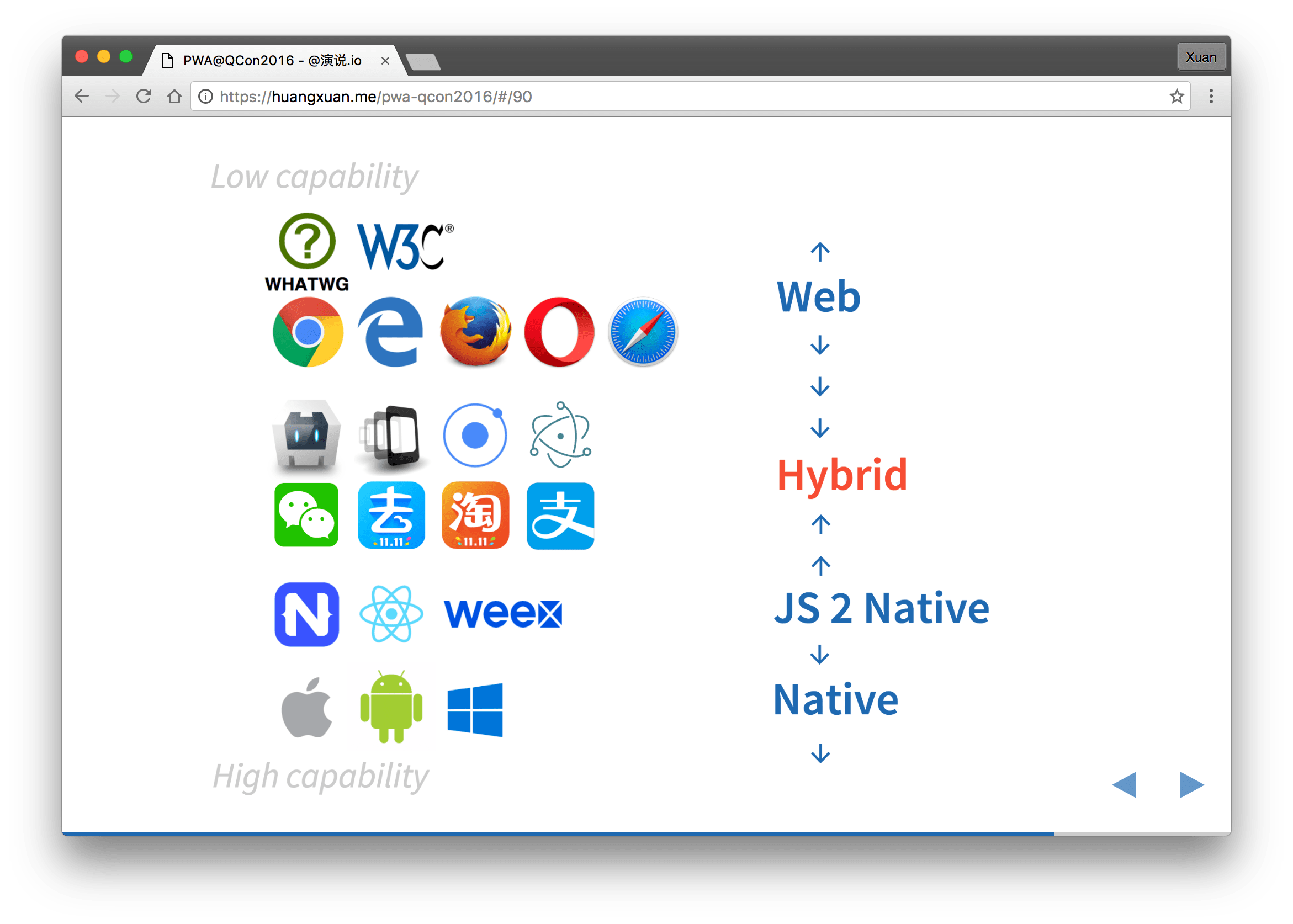 The many options, and one of my predictions
Let me make a reckless prediction. Heavy hybrid architectures and infrastructure are still the best answer in a lot of cases today. But as phones get faster and new technology matures and spreads, JS-to-native on one side and pure web apps led by PWA on the other will squeeze hybrid from both directions and take over the problems hybrid mostly solves today. JS-to-native will grow into cross-platform native development in the style of Xamarin. PWA will make the containers that hybrid apps build and ship much cheaper, until hybrid goes back to what it really is: calling a webview.
This isn't a guess out of nowhere. For the first, look at Alibaba's strategic move to Weex and at where WeChat Mini Programs are headed. For the second, look at how warmly the Cordova and Ionic hybrid communities have taken to PWA.
PWA in China
Among the PWA case studies Google promotes, Flipkart and Housing.com are from India, Lyft and the Washington Post are from North America, and the only one from China, AliExpress, mostly serves users outside China.
China is a special case, and when I first talked about PWA, I'll admit I was a bit pessimistic:
- China cares about iOS first, and iOS didn't support PWA at the time.
- Android in China is really "Anzhuang" (a badly fragmented Android). Chrome isn't preinstalled, and there may be other compatibility problems.
- Chinese phone makers may not be as keen as Samsung to get their browsers to support PWA.
- GCM doesn't work in China, so neither do push notifications that depend on it, and no Chinese push service had implemented the Web Push Protocol yet.
- The webview landscape in China is complicated (WeChat, for one) and full of black-magic hacks.
India, on the other hand, has working Google services, and most Android phones there come with Chrome, so PWAs can reach nearly 100% of users. No wonder they've been so well received there. I can only hope this post does something to make China friendlier to PWA. Either way, spring will probably come a little later for PWA in China.
Conclusion
"We believe in the Web, not just in terms of software, software platforms, and pure technology, but because 'anyone, at any time, anywhere, can publish anything on the World Wide Web, and it can be accessed by anyone in the world.' And that is what is truly revolutionary about the web. It is nothing less than an evolution of our species."
Please don't let the web keep slipping away from us. The browser vendors are working together again, and they're handing the baton to us, the people who build web apps. Steve Jobs once believed web apps were the future of mobile apps. Let's prove it with our code.
Let our users love the web as much as we do.
Hux, from Beijing in December.
Note: While I was writing this, Google announced developers.google.cn at Google Developer Days China, so developers in China can reach it more easily. Every developers.google.com page linked here should have a matching page on the .cn site.
AI-translated from the original